Arbeitszeit
Arbeitszeiten zuverlässig erfassen.
Flowtig Arbeitszeit unterstützt Organisationen dabei, Arbeitszeiten zu erfassen und berücksichtigt dabei automatisch Arbeitsverträge, Arbeitszeitmodelle, Urlaube, Feiertage und arbeitsrechtliche Vorgaben.
Anstatt Überstunden, Urlaubssalden oder Arbeitszeiten manuell zu berechnen, bietet Arbeitszeit einen zentralen Ort, an dem Mitarbeiter und Administratoren jederzeit einen zuverlässigen Überblick über die Arbeitszeit erhalten.
Ob kleines Unternehmen oder wachsende Organisation – Arbeitszeit vereinfacht die tägliche Personalverwaltung und reduziert gleichzeitig den administrativen Aufwand.
Arbeitszeitverwaltung
Arbeitszeit wurde entwickelt, um manuelle Berechnungen auf ein Minimum zu reduzieren.
Sobald Arbeitsverträge und Arbeitszeitmodelle konfiguriert sind, werden Arbeitszeiten, Überstunden, Urlaube und Validierungen automatisch berechnet.
Warum Arbeitszeit verwenden?
Die Verwaltung von Arbeitszeiten umfasst weit mehr als das Erfassen von Arbeitsbeginn und Arbeitsende.
Dabei stellen sich typische Fragen wie:
- Wie viele Stunden hat dieser Mitarbeiter gearbeitet?
- Wie viele Überstunden wurden angesammelt?
- Wie viele Urlaubstage sind noch verfügbar?
- Werden die arbeitsrechtlichen Vorgaben eingehalten?
- Wer arbeitet aktuell, ist abwesend oder im Urlaub?
Arbeitszeit beantwortet diese Fragen automatisch und sorgt gleichzeitig für Transparenz bei Mitarbeitern und Administratoren.
Übersicht
Mit Arbeitszeit können Sie:
- Tägliche Arbeitszeiten erfassen
- Arbeitsverträge verwalten
- Arbeitszeitmodelle konfigurieren
- Urlaube und Abwesenheiten verwalten
- Überstunden automatisch berechnen
- Arbeitsrechtliche Vorgaben prüfen
- Feiertage automatisch berücksichtigen
- Anwesenheiten im Team überwachen
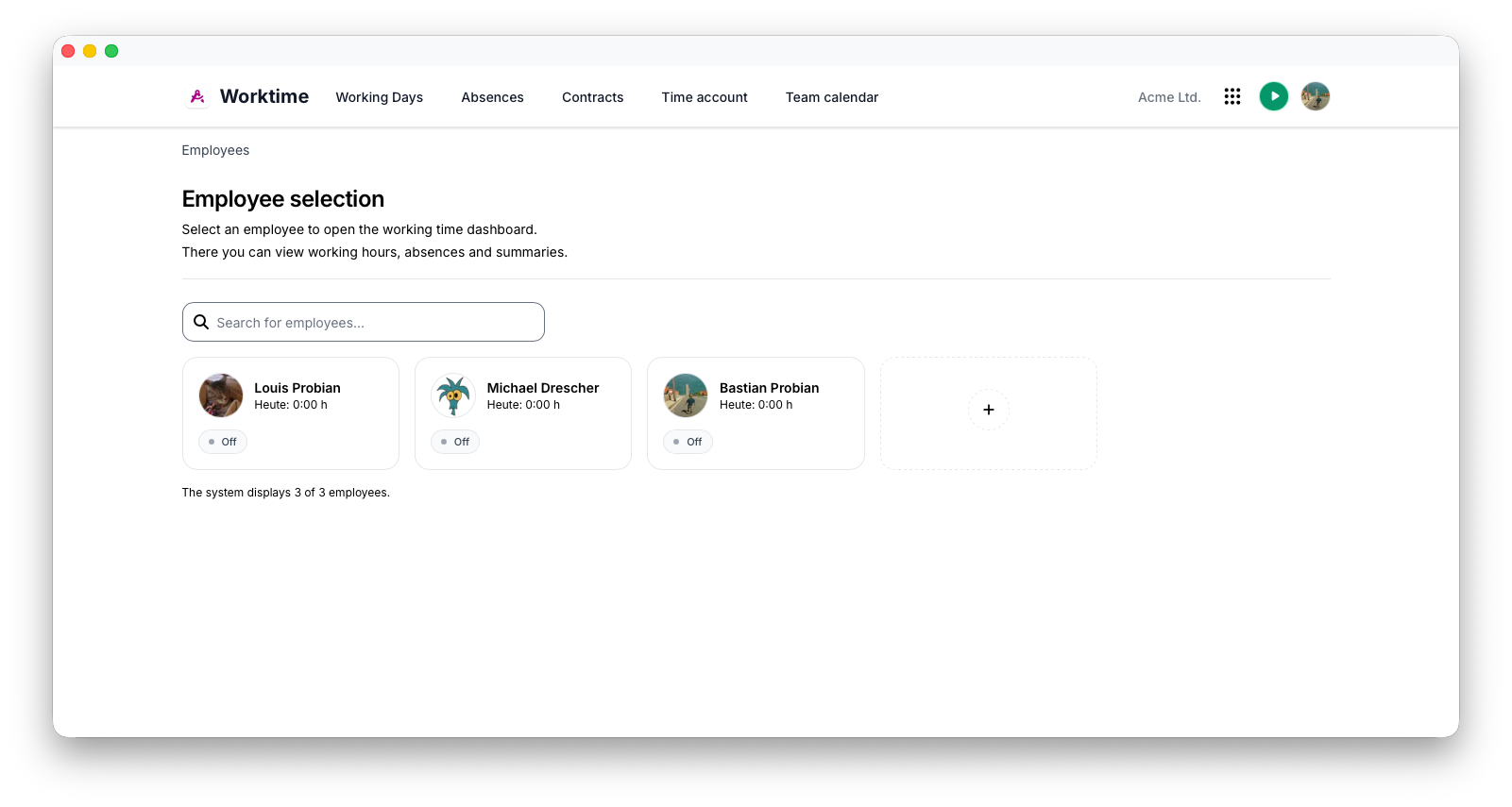
Erste Schritte
Die Einrichtung von Arbeitszeit erfordert nur wenige Schritte.
- Erstellen Sie Mitarbeiter über Kontakte.
- Weisen Sie einen Arbeitsvertrag zu.
- Konfigurieren Sie die Arbeitszeiten.
- Beginnen Sie mit der Erfassung der Arbeitszeit.
Von diesem Zeitpunkt an übernimmt Flowtig den Großteil der Berechnungen automatisch.
Tip
In den meisten Organisationen müssen Arbeitsverträge nur einmal konfiguriert werden. Die täglichen Arbeitszeitberechnungen erfolgen anschließend automatisch.
Arbeitsverträge
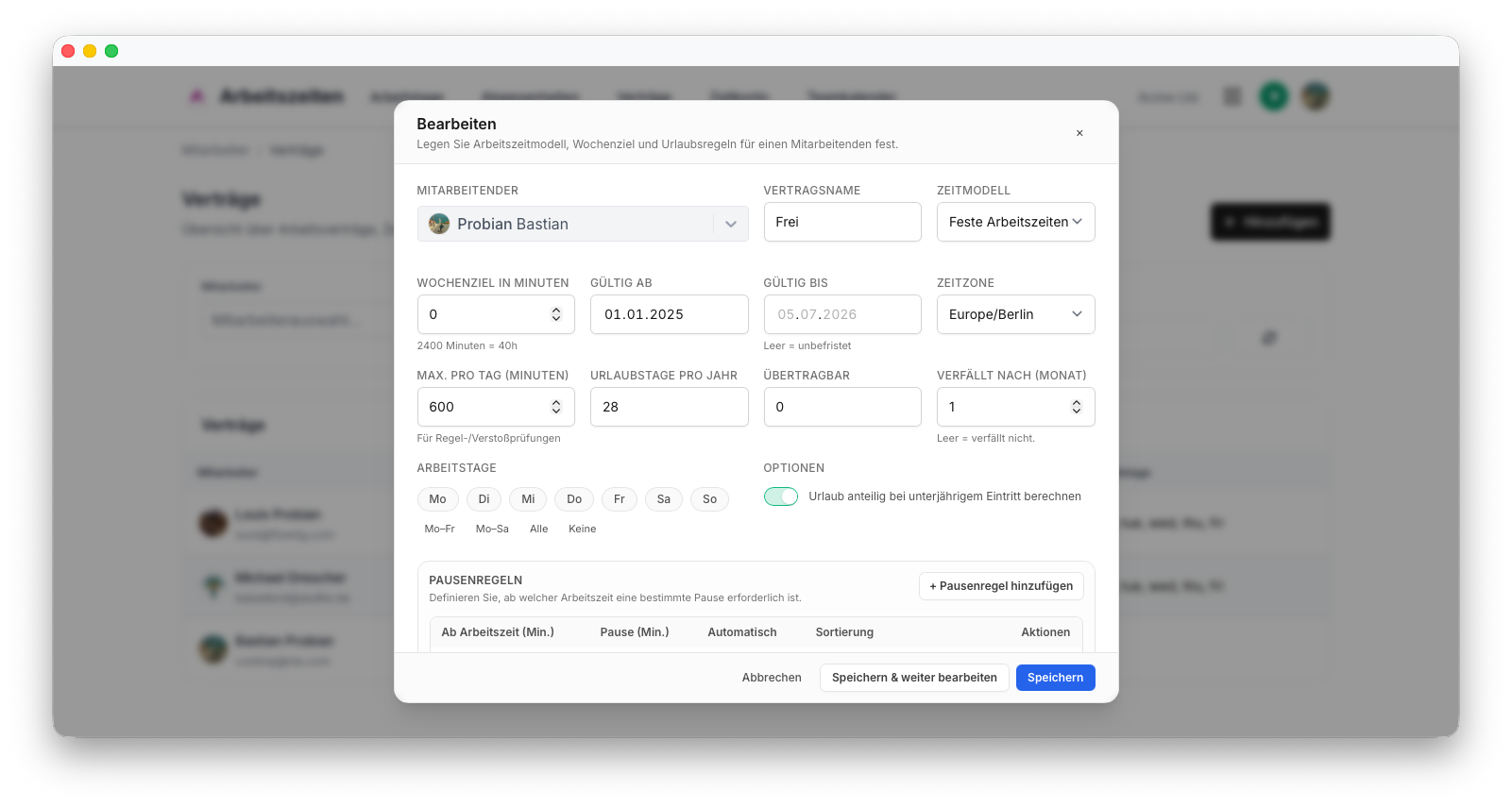
Jedem Mitarbeiter wird ein Arbeitsvertrag zugewiesen.
Arbeitsverträge definieren, wie erfasste Arbeitszeiten ausgewertet werden.
Typische Einstellungen sind:
| Einstellung | Beschreibung |
|---|---|
| Wochenstunden | Vertraglich vereinbarte Arbeitszeit |
| Arbeitstage | Montag–Sonntag |
| Urlaubsanspruch | Jährlicher Urlaubsanspruch |
| Arbeitszeitmodell | Fest, flexibel oder Schicht |
| Maximale Arbeitszeit | Tägliche Höchstarbeitszeit |
| Land | Berechnung von Feiertagen |
| Zeitzone | Berechnung der Arbeitszeiten |
Arbeitszeit erfassen
Arbeitszeit wird in einzelnen Zeitabschnitten erfasst.
Typische Abschnitte sind:
- Arbeit
- Pause
- Urlaub
- Krankheit
- Feiertag
Flowtig kombiniert diese Abschnitte zu vollständigen Arbeitstagen und führt die erforderlichen Berechnungen automatisch durch.
Note
Ein einzelner Tag kann mehrere Arbeits- und Pausenabschnitte enthalten.
Beispiel:
| Zeit | Tätigkeit |
|---|---|
| 08:00–12:00 | Arbeit |
| 12:00–12:30 | Pause |
| 12:30–17:00 | Arbeit |
Automatische Validierung
Bei jeder Änderung eines Arbeitstages prüft Flowtig die erfassten Daten automatisch.
Die Validierung umfasst:
- Erforderliche Pausen
- Maximale Arbeitszeiten
- Fehlende Arbeitszeit
- Ruhezeiten
- Einhaltung des Arbeitsvertrags
Warning
Mögliche Verstöße werden unmittelbar hervorgehoben, sodass Probleme bereits vor der Abrechnung oder Auswertung behoben werden können.
Urlaubs- & Abwesenheitsverwaltung
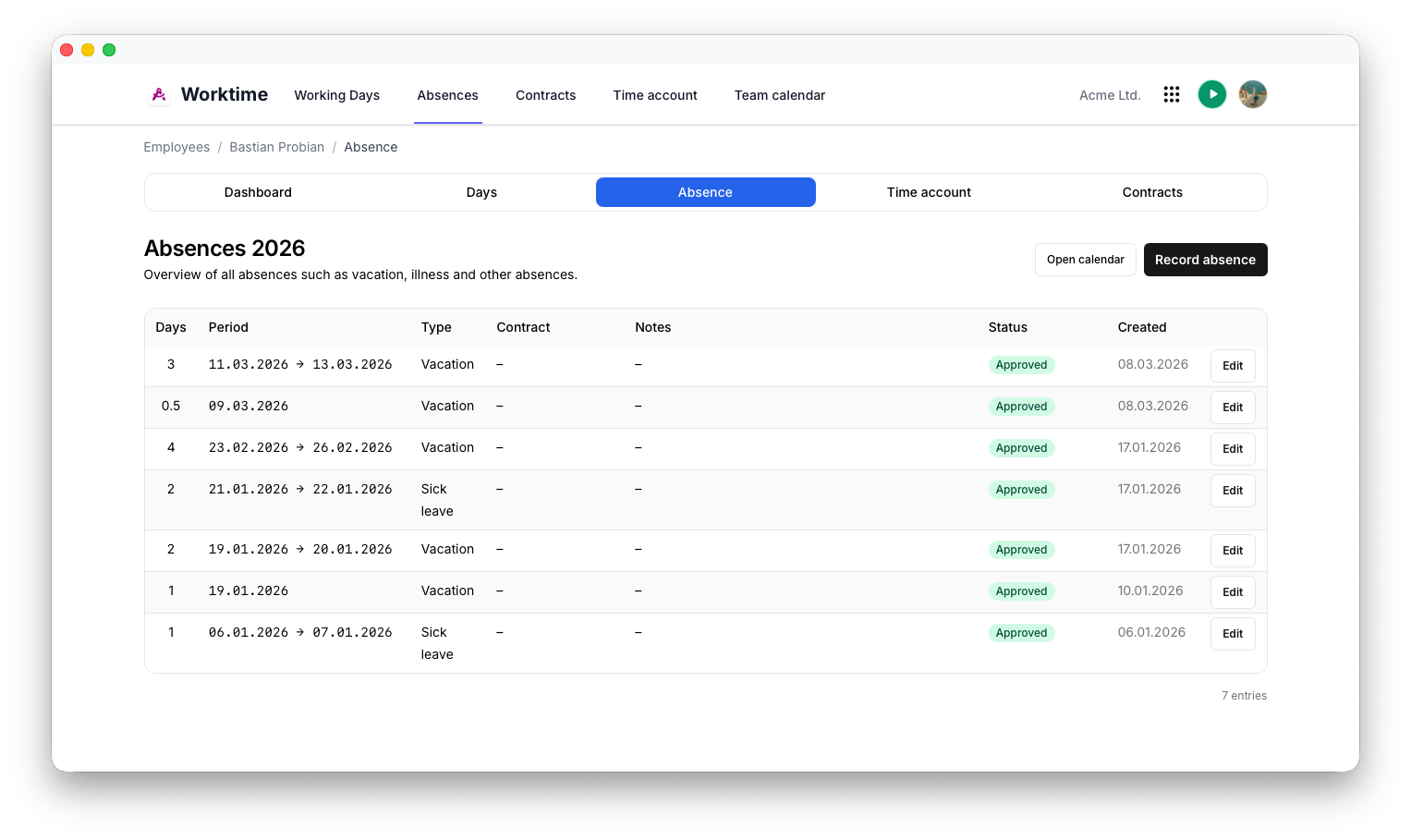
Mitarbeiter können Urlaubsanträge direkt in Arbeitszeit einreichen.
Unterstützte Abwesenheitsarten sind:
- Urlaub
- Halber Urlaubstag
- Krankheit
- Feiertage
- Sonstige Abwesenheiten
Flowtig berechnet automatisch:
- Verbleibenden Urlaub
- Genommenen Urlaub
- Übertragenen Resturlaub
- Betroffene Arbeitstage
Arbeitszeitkonten
Jeder Mitarbeiter verfügt über ein individuelles Arbeitszeitkonto.
Flowtig verwaltet kontinuierlich:
- Überstunden
- Manuelle Korrekturen
- Saldohistorie
- Aktuellen Saldo
Dadurch erhalten sowohl Mitarbeiter als auch Vorgesetzte vollständige Transparenz über das Arbeitszeitkonto.
Feiertage
Feiertage werden automatisch berechnet.
Länder und Regionen können individuell zugewiesen werden. Dadurch können Organisationen mit mehreren Standorten die Arbeitszeit für jeden Mitarbeiter korrekt berechnen.
Info
Regionale Feiertage werden automatisch bei allen Arbeitszeitberechnungen berücksichtigt.
Teamübersicht
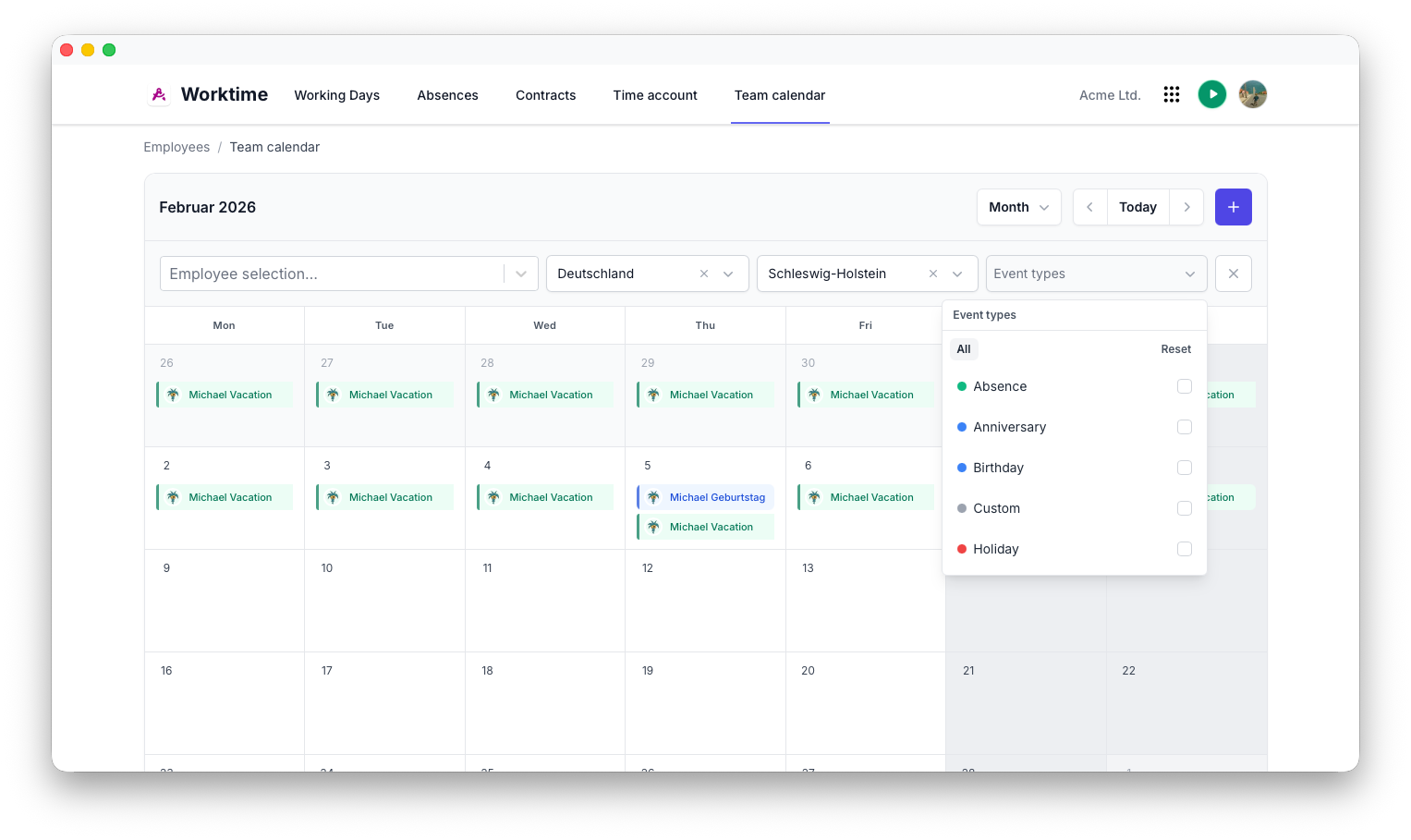
Vorgesetzte erhalten einen vollständigen Überblick über das Team.
Typische Informationen sind:
- Aktuell arbeitende Mitarbeiter
- Mitarbeiter im Urlaub
- Krankmeldungen
- Fehlende Arbeitszeiten
- Anwesenheitsstatistiken
Benachrichtigungen
Arbeitszeit ist in das Benachrichtigungssystem von Flowtig integriert.
Typische Benachrichtigungen umfassen:
- Ausstehende Urlaubsgenehmigungen
- Fehlende Arbeitszeiten
- Warnungen zu Arbeitsverträgen
- Genehmigungsanfragen
Zukünftige Versionen werden die Benachrichtigungsmöglichkeiten innerhalb der Plattform weiter ausbauen.
Berechtigungen
Arbeitszeit verwendet das zentrale Berechtigungssystem von Flowtig.
Typische Berechtigungen umfassen:
| Berechtigung | Beschreibung |
|---|---|
| Eigene Arbeitszeiten anzeigen | Mitarbeiter |
| Arbeitszeiten erfassen | Mitarbeiter |
| Team anzeigen | Vorgesetzte |
| Arbeitszeiten bearbeiten | Administratoren |
| Arbeitsverträge verwalten | Administratoren |
| Abwesenheiten genehmigen | Vorgesetzte und Administratoren |
Berechtigungen können unabhängig voneinander vergeben werden. Dadurch können Organisationen genau festlegen, wer Arbeitszeiten verwalten darf.
Empfehlungen
Empfehlung
Konfigurieren Sie Arbeitsverträge, bevor Mitarbeiter mit der Erfassung ihrer Arbeitszeiten beginnen.
Tip
Ermutigen Sie Mitarbeiter dazu, ihre Arbeitszeiten täglich zu erfassen. Dadurch reduziert sich der Korrekturaufwand am Monatsende erheblich.
Note
Prüfen Sie Validierungswarnungen regelmäßig, um sicherzustellen, dass Arbeitszeiten den internen Vorgaben und arbeitsrechtlichen Regelungen entsprechen.
Integrationen
Arbeitszeit lässt sich nahtlos mit anderen Flowtig-Anwendungen kombinieren.
| Anwendung | Integration |
|---|---|
| Kontakte | Mitarbeiterverwaltung |
| Kalender | Urlaube, Abwesenheiten und Feiertage |
| Zeiterfassung | Anwesenheit im Vergleich zur geleisteten Arbeit |
| Wiki | Personalrichtlinien und Arbeitszeitdokumentation |
Mit der weiteren Entwicklung der Flowtig-Plattform werden zusätzliche Integrationen verfügbar.
Häufig gestellte Fragen
Können Mitarbeiter mehrere Arbeitszeiträume pro Tag erfassen?
Ja.
Jeder Arbeitstag kann mehrere Arbeits- und Pausenabschnitte enthalten.
Berechnet Arbeitszeit Überstunden automatisch?
Ja.
Überstunden werden anhand des zugewiesenen Arbeitsvertrags und der erfassten Arbeitszeit automatisch berechnet.
Können Urlaubsanträge genehmigt werden?
Ja.
Urlaubsanträge durchlaufen einen Genehmigungsprozess, bevor sie wirksam werden.
Werden arbeitsrechtliche Vorgaben geprüft?
Ja.
Arbeitszeit prüft erfasste Arbeitszeiten anhand der konfigurierten Regeln und weist unmittelbar auf mögliche Verstöße hin.
Unterstützt Arbeitszeit unterschiedliche Arbeitszeitmodelle?
Ja.
Feste Arbeitszeiten, flexible Arbeitszeitmodelle und Schichtmodelle werden unterstützt.
Typischer Ablauf
Mitarbeiter erstellen
        │
        ▼
Arbeitsvertrag zuweisen
        │
        ▼
Arbeitszeit erfassen
        │
        ▼
Automatische Validierung
        │
        ▼
Überstunden & Abwesenheiten verwalten
Siehe auch
Arbeitszeit funktioniert besonders gut zusammen mit:
Benötigen Sie Hilfe?
Benötigen Sie Unterstützung bei Arbeitszeit?
Weitere Informationen finden Sie auf der Flowtig-Website oder über unseren Support:
- https://flowtig.com/apps/worktime
- https://flowtig.com/contact