Bauzeitenplaner
Bauprojekte von der ersten Aufgabe bis zur finalen Übergabe planen.
Flowtig Bauzeitenplaner unterstützt Bauunternehmen, Architekten und Projektleiter dabei, sämtliche Phasen eines Bauprojekts in einem zentralen Zeitplan zu organisieren.
Anstatt Zeitpläne in Tabellen oder voneinander getrennten Planungstools zu verwalten, bietet der Bauzeitenplaner einen strukturierten Projektplan mit Aufgaben, Abhängigkeiten, Meilensteinen und einem interaktiven Gantt-Diagramm. So behalten alle Beteiligten während des gesamten Projekts den Überblick.
Für die Bauplanung entwickelt
Der Bauzeitenplaner erstellt einen strukturierten Projektzeitplan, mit dem Teams Arbeiten koordinieren, Fortschritte überwachen und nachvollziehen können, wie einzelne Tätigkeiten zum Gesamtprojekt beitragen.
Warum Bauzeitenplaner verwenden?
Bauprojekte bestehen aus vielen voneinander abhängigen Abläufen.
Dabei stellen sich täglich Fragen wie:
- Welche Aufgabe sollte als Nächstes beginnen?
- Welche Tätigkeiten hängen voneinander ab?
- Was passiert, wenn sich eine Aufgabe verzögert?
- Liegen wir noch im Zeitplan?
- Welche Meilensteine wurden bereits erreicht?
Der Bauzeitenplaner bietet eine vollständige Übersicht über das gesamte Projekt und macht die Planung dadurch vorhersehbarer und die Kommunikation einfacher.
Übersicht
Mit dem Bauzeitenplaner können Sie:
- Bauphasen planen
- Projektaufgaben organisieren
- Abhängigkeiten zwischen Aufgaben definieren
- Meilensteine verwalten
- Zeitpläne mit einem interaktiven Gantt-Diagramm visualisieren
- Projektfortschritte überwachen
- Projektteams koordinieren
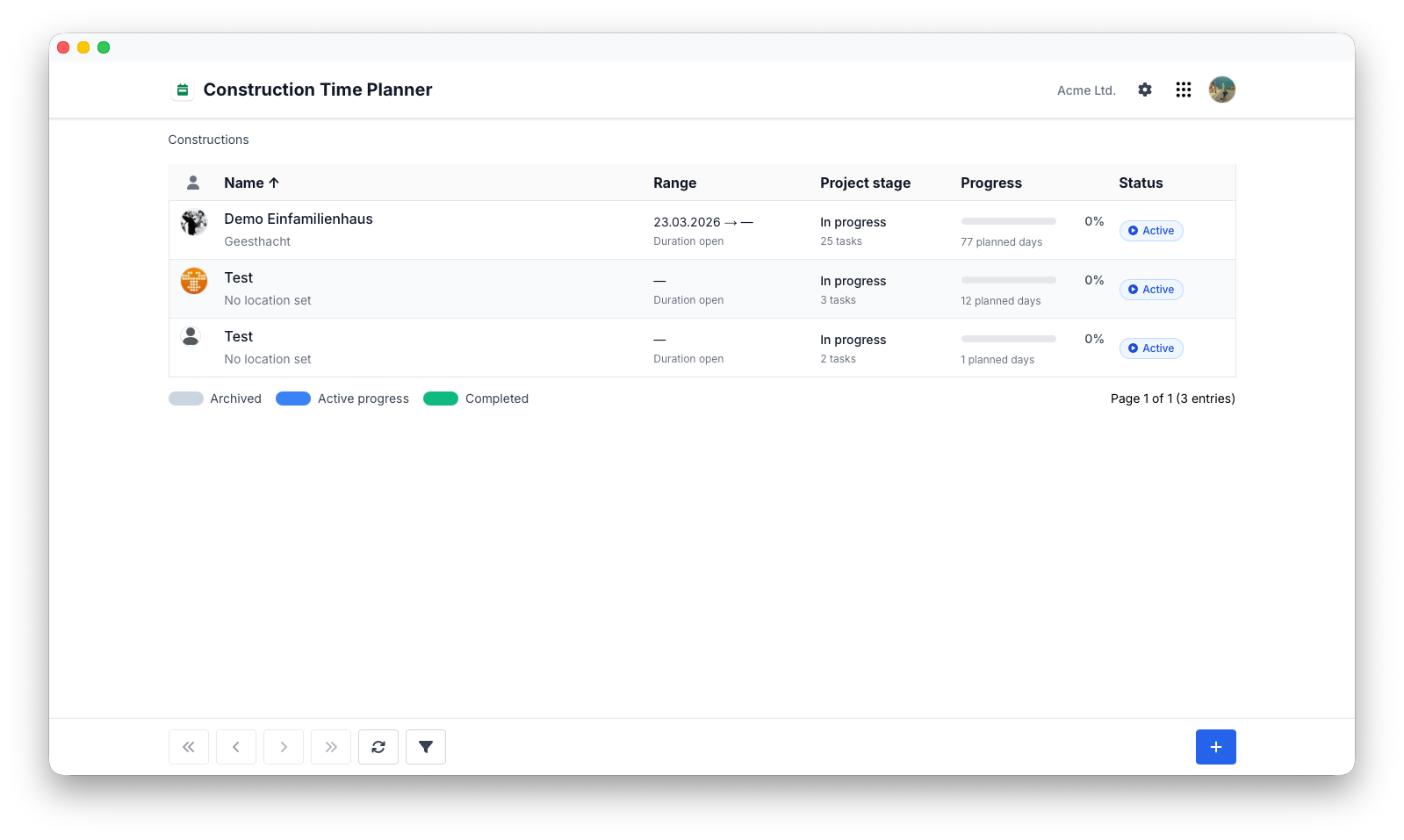
Projektplanung
Jedes Bauprojekt beginnt mit einem strukturierten Plan.
Mit dem Bauzeitenplaner können Projekte in logische Phasen gegliedert werden. Dadurch bleiben auch umfangreiche Bauvorhaben übersichtlich und einfach zu verwalten.
Typische Projektphasen sind:
- Baustelleneinrichtung und Vorbereitung
- Fundamentarbeiten
- Rohbau
- Dacharbeiten
- Innenausbau
- Endabnahme
Die Aufteilung eines Projekts in einzelne Phasen verbessert die Übersicht für alle Beteiligten.
Aufgaben
Projekte bestehen aus einzelnen Aufgaben, die die auszuführenden Arbeiten definieren.
Typische Aufgabeninformationen sind:
- Titel
- Beschreibung
- Startdatum
- Enddatum
- Dauer
- Fortschritt
- Status
- Verantwortliche Person
Gemeinsam bilden diese Aufgaben die Grundlage des Bauzeitenplans.
Abhängigkeiten
Bauarbeiten finden nur selten unabhängig voneinander statt.
Viele Tätigkeiten können erst beginnen, wenn vorherige Arbeiten abgeschlossen wurden.
Typische Beispiele sind:
- Fundamentarbeiten vor dem Rohbau
- Rohbau vor den Dacharbeiten
- Dacharbeiten vor dem Innenausbau
Abhängigkeiten machen Projektzeitpläne realistischer und zeigen unmittelbar, welche Auswirkungen Verzögerungen haben können.
Tip
Wenn Abhängigkeiten frühzeitig definiert werden, lassen sich zuverlässigere und besser planbare Bauzeitenpläne erstellen.
Meilensteine
Meilensteine kennzeichnen wichtige Ereignisse und erreichte Ziele innerhalb eines Projekts.
Typische Meilensteine sind:
- Baugenehmigung erhalten
- Fundamentarbeiten abgeschlossen
- Dach fertiggestellt
- Technische Abnahme
- Projektübergabe
Meilensteine schaffen klare Orientierungspunkte und erleichtern die Kommunikation über den Projektfortschritt.
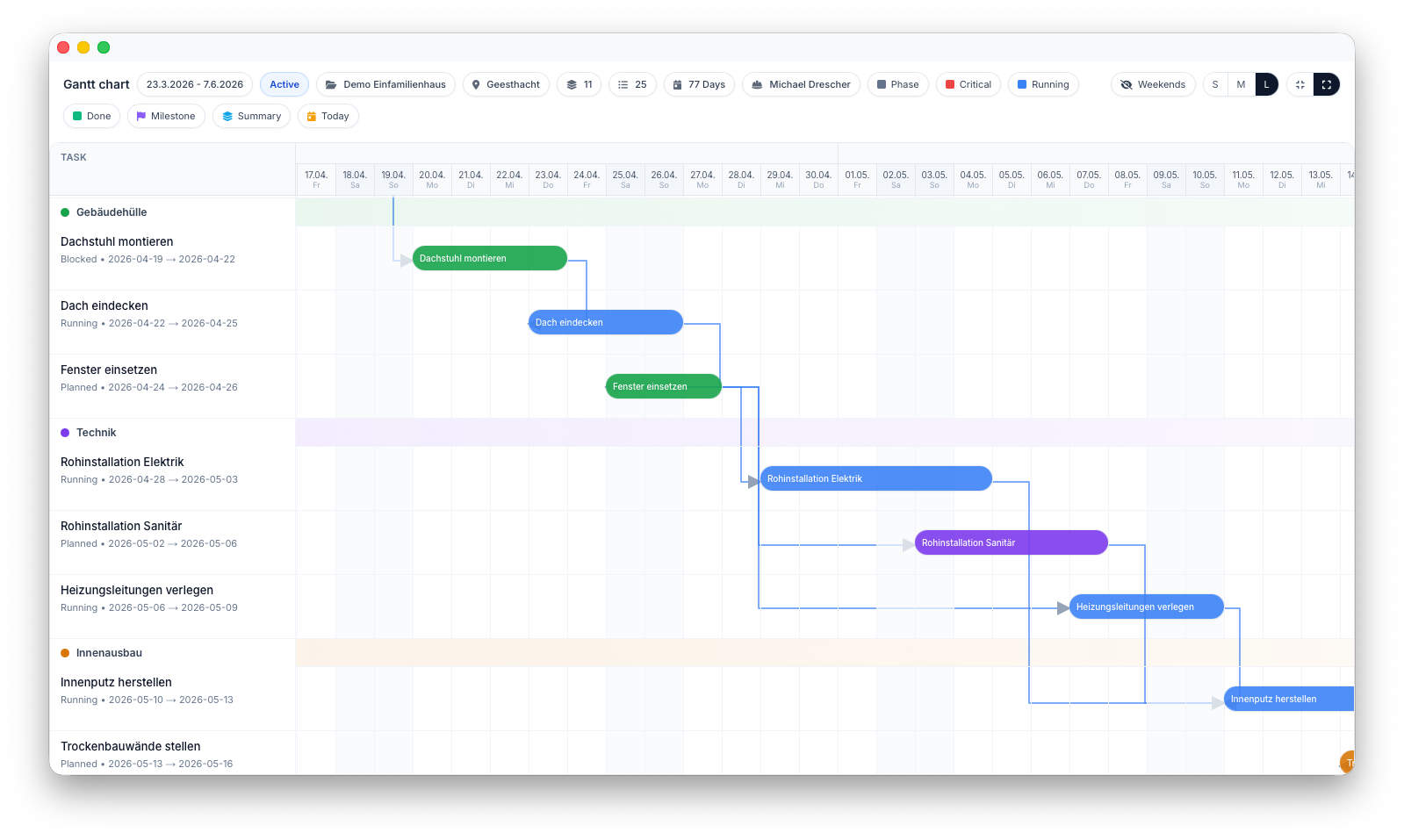
Interaktives Gantt-Diagramm
Das interaktive Gantt-Diagramm bietet eine visuelle Übersicht über den gesamten Bauzeitenplan.
Projektleiter können damit schnell erkennen:
- Aktive Aufgaben
- Anstehende Arbeiten
- Abgeschlossene Phasen
- Projektmeilensteine
- Abhängigkeiten zwischen Aufgaben
Fortschrittsverfolgung
Der Projektfortschritt kann während des gesamten Bauprojekts überwacht werden.
Typische Fortschrittsstatus sind:
- Nicht begonnen
- In Bearbeitung
- Abgeschlossen
Aktuelle Fortschrittsinformationen helfen allen Beteiligten dabei, den derzeitigen Stand des Projekts zu verstehen.
Teamkoordination
An Bauprojekten sind häufig mehrere Unternehmen, Nachunternehmer und weitere Beteiligte beteiligt.
Der Bauzeitenplaner stellt einen gemeinsamen Projektzeitplan bereit, der dabei hilft, Verantwortlichkeiten zu koordinieren und die Zusammenarbeit innerhalb des gesamten Projektteams zu verbessern.
Berechtigungen
Der Bauzeitenplaner verwendet das zentrale Berechtigungssystem von Flowtig.
Typische Berechtigungen umfassen:
| Berechtigung | Beschreibung |
|---|---|
| Projekte anzeigen | Bauzeitenpläne einsehen |
| Projekte erstellen | Neue Bauprojekte erstellen |
| Zeitpläne bearbeiten | Projektzeitpläne ändern |
| Aufgaben verwalten | Projektaufgaben erstellen und bearbeiten |
| Meilensteine verwalten | Projektmeilensteine verwalten |
Berechtigungen können unabhängig voneinander vergeben werden. Dadurch können Organisationen genau steuern, wer Bauprojekte planen und verwalten darf.
Empfehlungen
Empfehlung
Definieren Sie zunächst die wesentlichen Bauphasen, bevor Sie detaillierte Aufgaben erstellen. Ein gut strukturiertes Projekt lässt sich während seines gesamten Lebenszyklus leichter verwalten.
Tip
Überprüfen Sie die Dauer und Abhängigkeiten von Aufgaben regelmäßig, damit der Zeitplan den tatsächlichen Stand des Bauprojekts widerspiegelt.
Note
Halten Sie Meilensteine aktuell, damit Kunden und andere Projektbeteiligte jederzeit einen klaren Überblick über den Gesamtfortschritt erhalten.
Integrationen
Der Bauzeitenplaner lässt sich nahtlos mit anderen Flowtig-Anwendungen kombinieren.
| Anwendung | Integration |
|---|---|
| Bautagebuch | Geplante Tätigkeiten mit dem tatsächlichen Baufortschritt vergleichen |
| Kalender | Meilensteine und wichtige Projekttermine anzeigen |
| Kontakte | Projektpartner, Nachunternehmer und weitere Beteiligte |
Mit dem weiteren Ausbau der Flowtig-Plattform werden zusätzliche Integrationen verfügbar.
Häufig gestellte Fragen
Kann ich mehrere Bauprojekte verwalten?
Ja.
Der Bauzeitenplaner unterstützt mehrere unabhängige Projekte mit jeweils eigenen Zeitplänen, Aufgaben und Meilensteinen.
Unterstützt die Anwendung Gantt-Diagramme?
Ja.
Projekte werden mithilfe eines interaktiven Gantt-Diagramms visualisiert, das eine vollständige Übersicht über den Bauzeitenplan bietet.
Können Aufgaben voneinander abhängig sein?
Ja.
Mit Abhängigkeiten können Tätigkeiten miteinander verknüpft und dadurch realistischere Bauzeitenpläne erstellt werden.
Können Meilensteine erstellt werden?
Ja.
Meilensteine kennzeichnen wichtige Ereignisse und bieten Orientierungspunkte während des gesamten Projekts.
Ist der Bauzeitenplaner auch für kleine Projekte geeignet?
Ja.
Ob Sie ein kleines Wohnbauprojekt oder ein größeres gewerbliches Bauvorhaben planen – der Bauzeitenplaner eignet sich für Projekte unterschiedlicher Größenordnungen.
Typischer Ablauf
Projekt erstellen
        │
        ▼
Projektphasen definieren
        │
        ▼
Aufgaben erstellen
        │
        ▼
Abhängigkeiten verknüpfen
        │
        ▼
Fortschritt überwachen
        │
        ▼
Projekt abschließen
Siehe auch
Der Bauzeitenplaner funktioniert besonders gut zusammen mit:
Benötigen Sie Hilfe?
Benötigen Sie Unterstützung beim Bauzeitenplaner?
Weitere Informationen finden Sie auf der Flowtig-Website oder über unseren Support:
- https://flowtig.com/apps/construction-time-planner
- https://flowtig.com/contact