Zeiterfassung
Verstehen Sie, wofür Ihr Team seine Arbeitszeit einsetzt.
Flowtig Zeiterfassung unterstützt Organisationen dabei, die für Kunden, Projekte und Tätigkeiten geleistete Arbeit zu erfassen.
Im Gegensatz zur Erfassung von Anwesenheiten oder vertraglichen Arbeitszeiten beantwortet die Zeiterfassung eine andere Frage: Woran wurde gearbeitet?
Ganz gleich, ob Sie Leistungen gegenüber Kunden abrechnen, Projektkosten analysieren oder einfach besser verstehen möchten, womit Ihr Team seine Zeit verbringt – die Zeiterfassung liefert Ihnen die benötigten Einblicke.
Zeiterfassung ist nicht Arbeitszeit
Arbeitszeit beantwortet die Frage, wann jemand gearbeitet hat.
Zeiterfassung beantwortet die Frage, woran gearbeitet wurde.
Gemeinsam liefern beide Anwendungen ein vollständiges Bild von Anwesenheit und geleisteter Arbeit.
Warum Zeiterfassung verwenden?
Zu verstehen, wofür Arbeitszeit eingesetzt wird, ist entscheidend für Planung, Abrechnung und kontinuierliche Verbesserungen.
Dabei stellen sich typische Fragen wie:
- Wie viel Zeit haben wir für diesen Kunden aufgewendet?
- Welches Projekt hat den größten Aufwand verursacht?
- Welche Tätigkeiten beanspruchen die meiste Zeit?
- Wie viele abrechenbare Stunden haben wir erfasst?
- Welche Projekte werden aufwendiger als erwartet?
Die Zeiterfassung bietet einen strukturierten Überblick darüber, wofür Arbeitszeit tatsächlich eingesetzt wird.
Übersicht
Mit der Zeiterfassung können Sie:
- Arbeitszeiten erfassen
- Zeiten Kunden zuordnen
- Projekte und Tätigkeiten organisieren
- Abrechenbare und nicht abrechenbare Arbeit unterscheiden
- Vergangene Zeiteinträge einsehen
- Projektaufwände analysieren
- Auswertungen erstellen
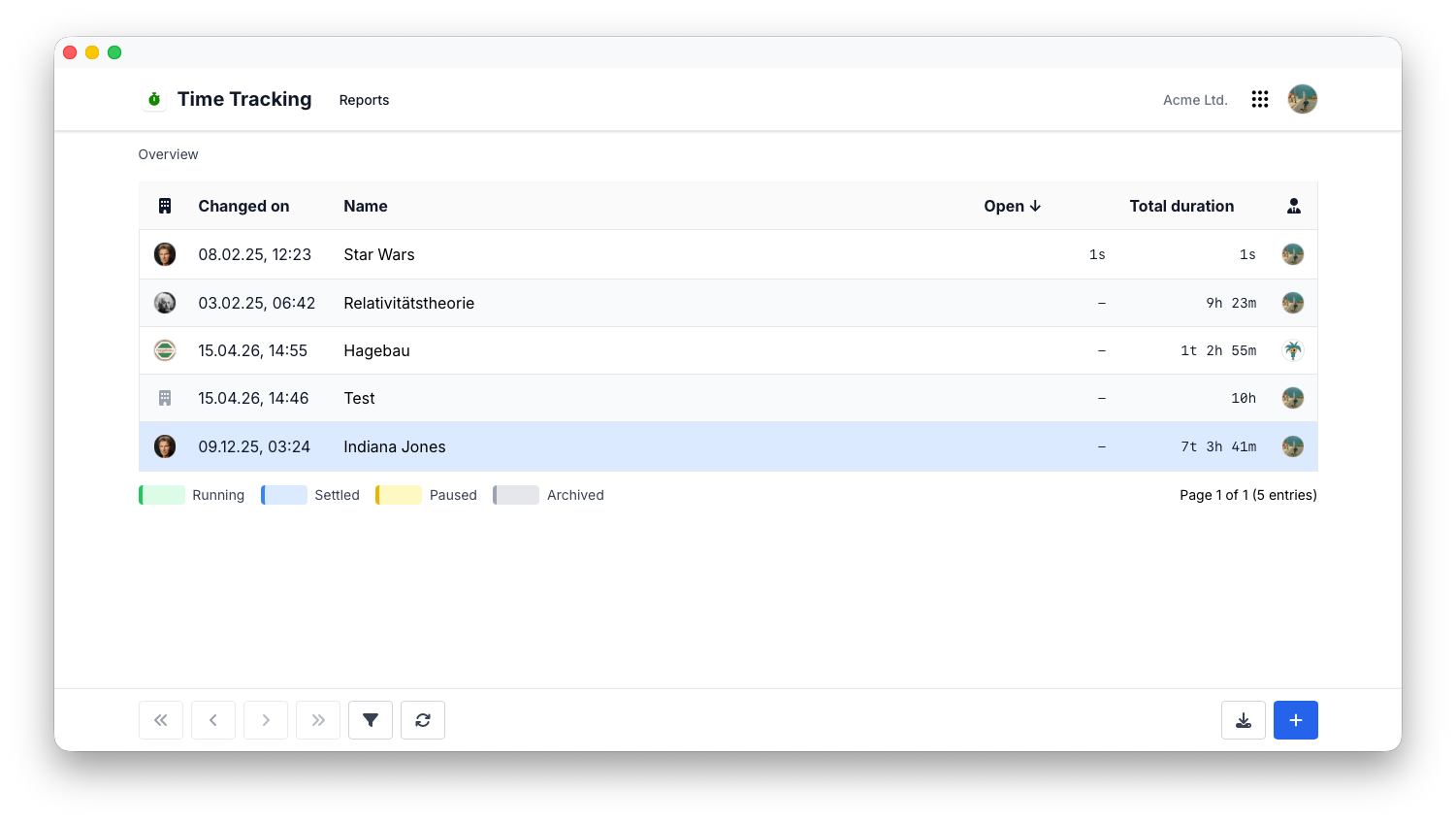
Zeit erfassen
Die Erfassung von Arbeitszeit ist einfach und flexibel.
Jeder Zeiteintrag kann Informationen enthalten wie:
- Kunde
- Projekt
- Tätigkeit
- Beschreibung
- Dauer
- Abrechenbarkeit
Einträge können bei Bedarf nachträglich korrigiert werden.
Tip
Erfassen Sie Arbeitszeiten möglichst direkt nach Abschluss einer Tätigkeit. Dadurch werden Auswertungen und Kundenabrechnungen genauer.
Kunden & Projekte
Jede erfasste Arbeitszeit gehört zu einer bestimmten Tätigkeit oder einem bestimmten Zusammenhang.
Zeiteinträge können beispielsweise folgenden Bereichen zugeordnet werden:
- Kundenprojekte
- Interne Projekte
- Besprechungen
- Supportanfragen
- Entwicklung
- Beratung
Dadurch entsteht ein vollständiger Überblick darüber, wofür die Arbeitszeit Ihrer Organisation eingesetzt wird.
Tätigkeiten
Tätigkeiten klassifizieren die Art der ausgeführten Arbeit.
Typische Beispiele sind:
- Entwicklung
- Beratung
- Design
- Support
- Verwaltung
- Vertrieb
Einheitliche Tätigkeitskategorien machen Auswertungen deutlich aussagekräftiger.
Abrechenbare Zeit
Nicht jede Arbeitsstunde kann gegenüber einem Kunden abgerechnet werden.
Die Zeiterfassung unterscheidet zwischen:
- Abrechenbarer Arbeit
- Nicht abrechenbarer Arbeit
Dadurch können Organisationen die Wirtschaftlichkeit von Projekten, interne Kosten und den für Kunden erbrachten Aufwand besser nachvollziehen.
Bessere Geschäftsentscheidungen
Die Trennung von abrechenbarer und nicht abrechenbarer Arbeit liefert wertvolle Einblicke in Wirtschaftlichkeit und Ressourceneinsatz.
Auswertungen & Analysen
Erfasste Zeiten werden besonders wertvoll, wenn sie ausgewertet werden können.
Typische Auswertungen sind:
- Zeit pro Kunde
- Zeit pro Projekt
- Zeit pro Tätigkeit
- Zeit pro Mitarbeiter
- Zeit pro Zeitraum
Auswertungen helfen Organisationen dabei zu verstehen, wofür Zeit eingesetzt wird, und unterstützen fundiertere Geschäftsentscheidungen.
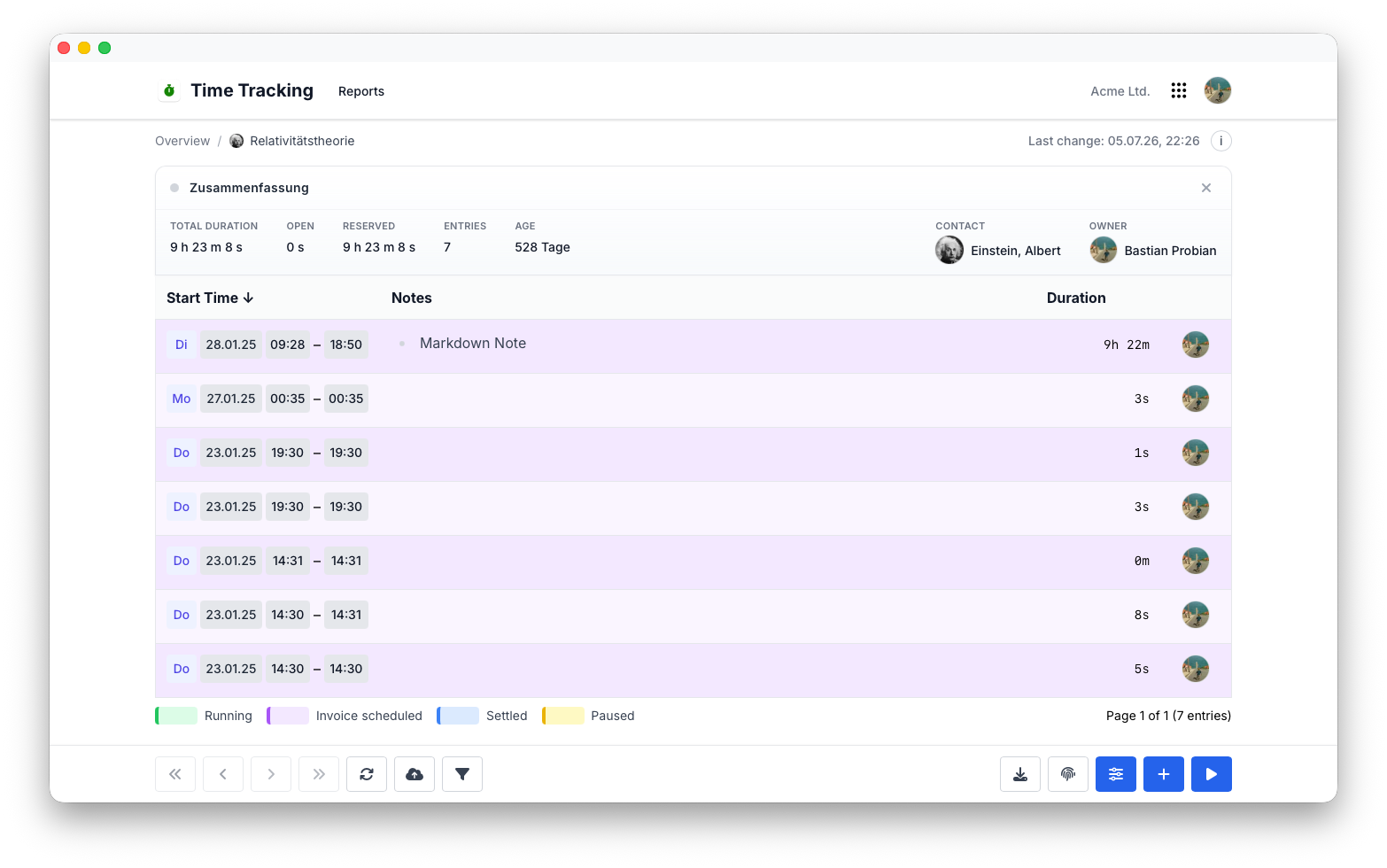
Suche & Historie
Jeder erfasste Zeiteintrag bleibt für spätere Auswertungen verfügbar.
Typische Suchkriterien sind:
- Kunde
- Projekt
- Tätigkeit
- Mitarbeiter
- Datum
- Beschreibung
Historische Informationen ermöglichen es, frühere Arbeiten bei Bedarf jederzeit nachzuvollziehen.
Berechtigungen
Die Zeiterfassung verwendet das zentrale Berechtigungssystem von Flowtig.
Typische Berechtigungen umfassen:
| Berechtigung | Beschreibung |
|---|---|
| Zeiteinträge anzeigen | Erfasste Arbeitszeiten einsehen |
| Zeiteinträge erstellen | Arbeitszeiten erfassen |
| Zeiteinträge bearbeiten | Bestehende Einträge ändern |
| Zeiteinträge löschen | Zeiteinträge entfernen |
| Auswertungen anzeigen | Auf Auswertungen und Statistiken zugreifen |
Berechtigungen können unabhängig voneinander vergeben werden. Dadurch behalten Organisationen die vollständige Kontrolle über erfasste Arbeitszeiten.
Empfehlungen
Empfehlung
Erfassen Sie Zeiten kontinuierlich während des Arbeitstages, anstatt diese später aus dem Gedächtnis zu rekonstruieren.
Tip
Verwenden Sie innerhalb Ihrer Organisation einheitliche Bezeichnungen für Tätigkeiten, um die Qualität Ihrer Auswertungen zu verbessern.
Note
Ergänzen Sie nach Möglichkeit aussagekräftige Beschreibungen. Dadurch lassen sich historische Zeiteinträge später wesentlich leichter nachvollziehen.
Integrationen
Die Zeiterfassung lässt sich nahtlos mit anderen Flowtig-Anwendungen kombinieren.
| Anwendung | Integration |
|---|---|
| Arbeitszeit | Anwesenheiten und vertragliche Arbeitszeiten |
| Kontakte | Kunden und Geschäftspartner |
| Kalender | Geschäftliche Termine und Projektplanung |
| Rechnungen | Erfasste Leistungen abrechnen (geplant) |
Mit der weiteren Entwicklung der Plattform werden zusätzliche Integrationen verfügbar.
Häufig gestellte Fragen
Was ist der Unterschied zwischen Zeiterfassung und Arbeitszeit?
Arbeitszeit erfasst Anwesenheiten und vertragliche Arbeitszeiten.
Die Zeiterfassung dokumentiert, welche Arbeiten für Kunden, Projekte und Tätigkeiten durchgeführt wurden.
Gemeinsam bieten beide Anwendungen einen vollständigen Überblick über Anwesenheit und geleistete Arbeit.
Kann ich Zeiten Kunden zuordnen?
Ja.
Jeder Zeiteintrag kann einem Kunden und einem Projekt zugeordnet werden.
Können Projektaufwände analysiert werden?
Ja.
Die Zeiterfassung bietet Auswertungen, mit denen sich Projektaufwände, Kundenleistungen und der Ressourceneinsatz analysieren lassen.
Kann ich zwischen abrechenbarer und nicht abrechenbarer Arbeit unterscheiden?
Ja.
Jeder Zeiteintrag kann entsprechend gekennzeichnet werden. Dadurch können Organisationen die Wirtschaftlichkeit ihrer Arbeit genauer analysieren.
Können erfasste Zeiten später bearbeitet werden?
Ja.
Abhängig von den Berechtigungen Ihrer Organisation können Zeiteinträge nachträglich bearbeitet werden.
Typischer Ablauf
Arbeit durchführen
      │
      ▼
Zeit erfassen
      │
      ▼
Kunde & Tätigkeit zuordnen
      │
      ▼
Auswertungen prüfen
      │
      ▼
Projektaufwand analysieren
Siehe auch
Die Zeiterfassung funktioniert besonders gut zusammen mit:
Benötigen Sie Hilfe?
Benötigen Sie Unterstützung bei der Zeiterfassung?
Weitere Informationen finden Sie auf der Flowtig-Website oder über unseren Support:
- https://flowtig.com/apps/time-tracking
- https://flowtig.com/contact