Rechnungen
Vom Angebot bis zur Zahlung – verwalten Sie Ihren gesamten Rechnungsprozess.
Flowtig Rechnungen unterstützt Organisationen dabei, Angebote und Rechnungen während ihres gesamten Lebenszyklus zu erstellen, zu verwalten und nachzuverfolgen.
Vom ersten Angebot bis zur endgültigen Zahlung bleiben alle Dokumente organisiert, durchsuchbar und mit der restlichen Flowtig-Plattform verbunden. Ganz gleich, ob Sie eine einzelne Rechnung versenden oder wiederkehrende Abrechnungen verwalten – Flowtig sorgt für einen strukturierten und transparenten Rechnungsprozess.
Rechnungen eignet sich für Selbstständige, Agenturen und wachsende Unternehmen gleichermaßen und lässt sich nahtlos mit Kontakte und anderen Flowtig-Anwendungen kombinieren.
Für moderne Rechnungsstellung entwickelt
Flowtig unterstützt sowohl klassische PDF-Rechnungen als auch moderne elektronische Rechnungsstandards wie ZUGFeRD und XRechnung und hilft Organisationen damit, aktuelle Anforderungen an die Rechnungsstellung zu erfüllen.
Warum Rechnungen verwenden?
Jede Organisation ist auf einen strukturierten Rechnungsprozess angewiesen.
Dabei stellen sich typische Fragen wie:
- Welche Angebote warten noch auf eine Freigabe?
- Welche Rechnungen wurden bereits bezahlt?
- Welche Zahlungen sind überfällig?
- Welcher Kunde hat den höchsten Umsatz erzielt?
- Wie lassen sich wiederkehrende Rechnungen automatisieren?
Rechnungen bietet einen vollständigen Überblick über Ihren Verkaufs- und Abrechnungsprozess.
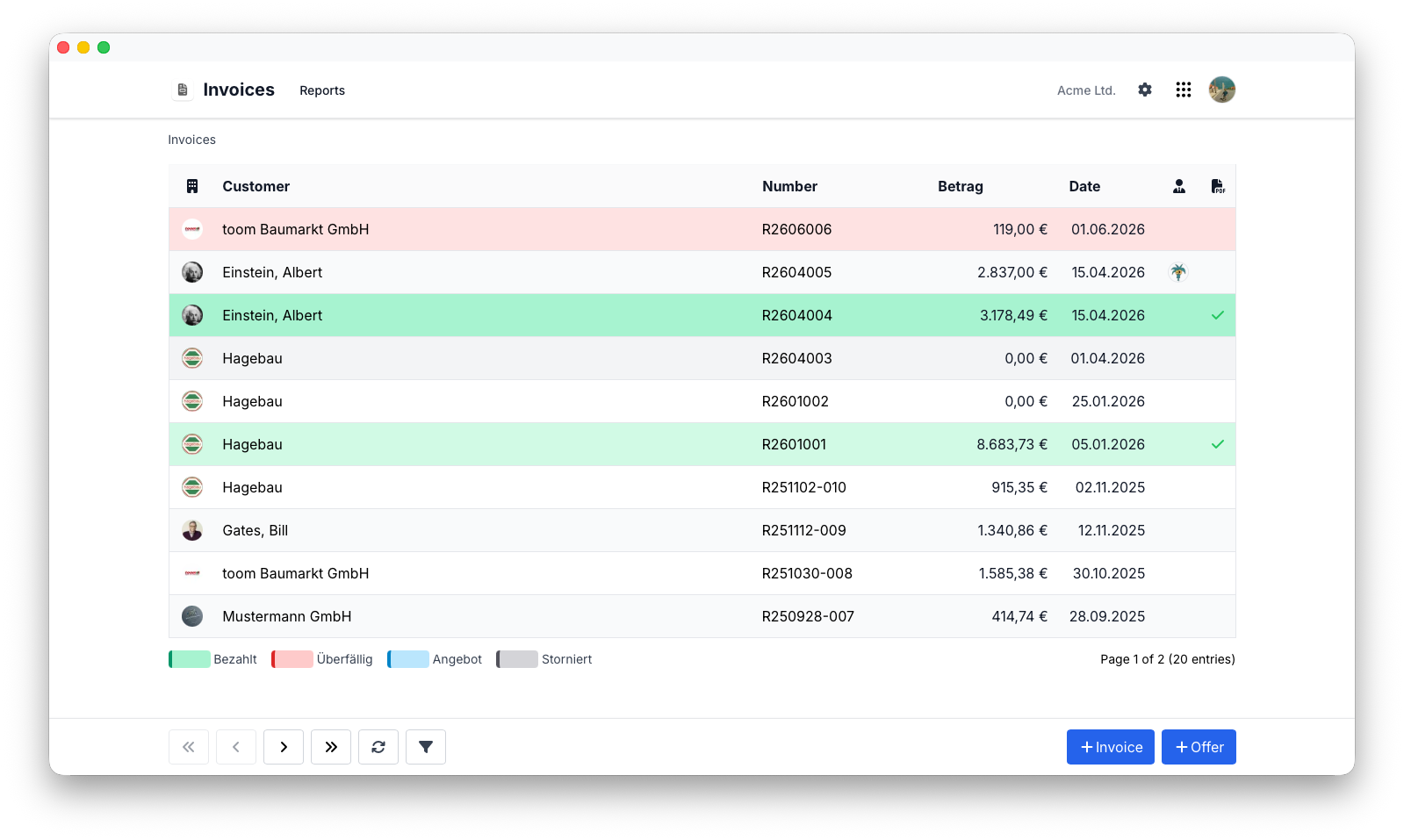
Übersicht
Mit Rechnungen können Sie:
- Professionelle Angebote erstellen
- Angebote in Rechnungen umwandeln
- PDF-Rechnungen erzeugen
- Elektronische Rechnungen exportieren
- Rechnungsstatus verfolgen
- Zahlungseingänge erfassen
- Wiederkehrende Rechnungen erstellen
- Rechnungshistorien einsehen
Angebote
Viele Geschäftsbeziehungen beginnen mit einem Angebot.
Flowtig ermöglicht es, Angebote zu erstellen, zu prüfen und anschließend in Rechnungen umzuwandeln, ohne dieselben Informationen erneut eingeben zu müssen.
Typischer Ablauf:
Angebot
   │
   ▼
Angenommen
   │
   ▼
Rechnung
Dadurch wird doppelte Arbeit vermieden und der Verkaufsprozess bleibt transparent.
Rechnungen erstellen
Die Erstellung einer Rechnung beginnt mit der Auswahl eines Kunden.
Typische Rechnungsinformationen sind:
- Rechnungspositionen
- Mengen
- Einzelpreise
- Steuern
- Rabatte
- Notizen
Flowtig berechnet während der Bearbeitung automatisch Summen, Steuern und Rechnungsbeträge.
Tip
Speichern Sie häufig verwendete Rechnungspositionen, um die Erstellung von Rechnungen deutlich zu beschleunigen.
Rechnungspositionen
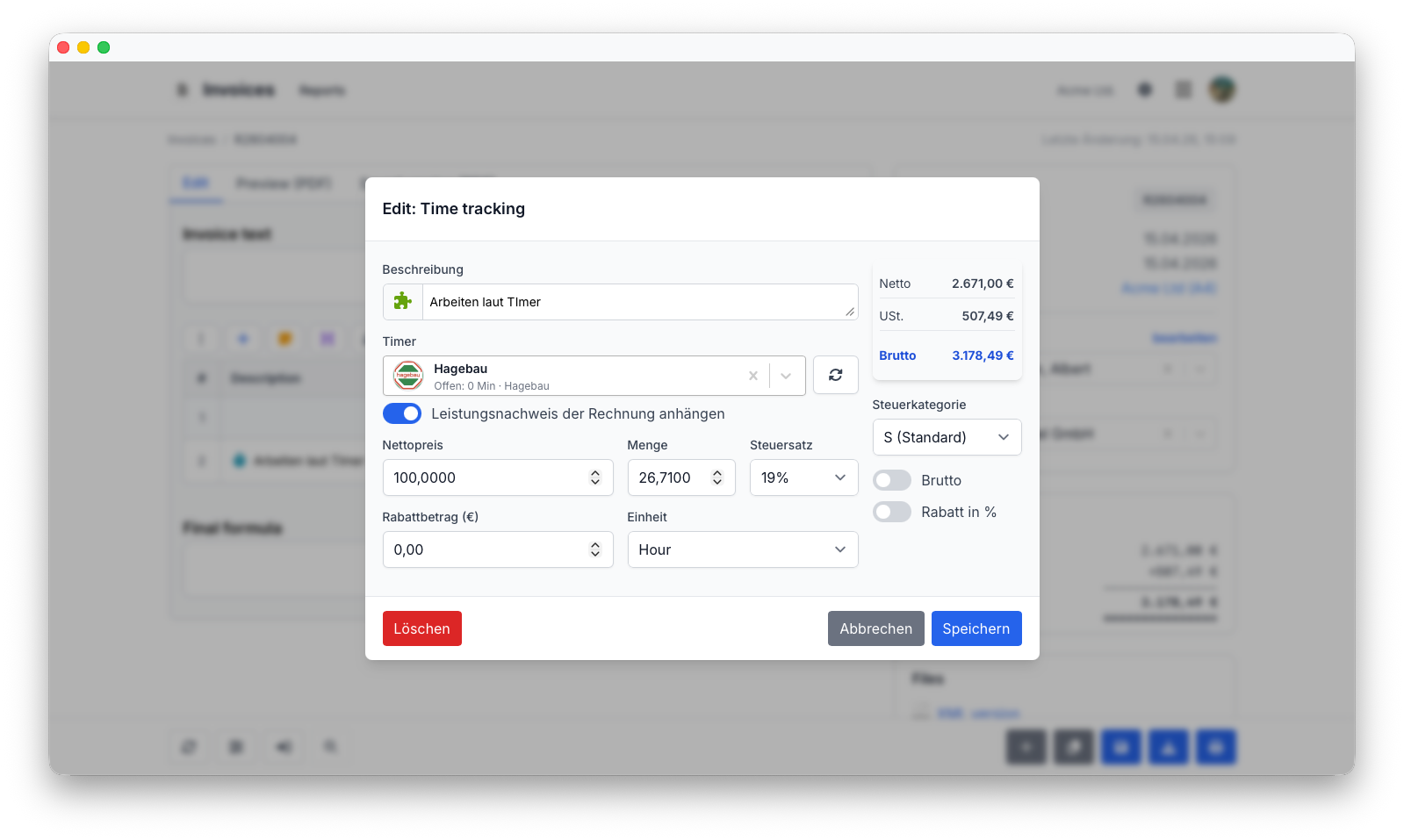
Rechnungen bestehen aus einer oder mehreren Rechnungspositionen.
Jede Position kann folgende Informationen enthalten:
- Beschreibung
- Menge
- Einheit
- Einzelpreis
- Steuersatz
- Rabatt
Sobald eine Position geändert wird, berechnet Flowtig die Rechnungssummen automatisch neu.
Rechnungsstatus
Jede Rechnung durchläuft einen klar definierten Lebenszyklus.
Typische Status sind:
| Status | Beschreibung |
|---|---|
| Entwurf | Die Rechnung wird vorbereitet |
| Versendet | Die Rechnung wurde an den Empfänger übermittelt |
| Bezahlt | Die Zahlung wurde erhalten |
| Überfällig | Das Zahlungsziel wurde überschritten |
| Storniert | Die Rechnung ist nicht mehr gültig |
Die Statusverfolgung bietet einen klaren Überblick über Rechnungen, bei denen Handlungsbedarf besteht.
Elektronische Rechnungen
Flowtig unterstützt moderne elektronische Rechnungsstandards.
Unterstützte Formate sind:
- ZUGFeRD
- XRechnung
Elektronische Rechnungen vereinfachen den digitalen Rechnungsaustausch und unterstützen die Einhaltung aktueller gesetzlicher Anforderungen.
Info
Elektronische Rechnungen können mithilfe anerkannter Standards sowohl mit Geschäftskunden als auch mit öffentlichen Auftraggebern ausgetauscht werden.
PDF-Erstellung
Professionelle PDF-Rechnungen können mit wenigen Schritten erstellt werden.
Die erzeugten Dokumente enthalten typischerweise:
- Unternehmensinformationen
- Kundendaten
- Rechnungspositionen
- Steuerübersicht
- Zahlungsinformationen
Dadurch erhalten alle Rechnungen ein einheitliches und professionelles Erscheinungsbild.
Wiederkehrende Rechnungen
Wiederkehrende Rechnungen helfen dabei, regelmäßige Abrechnungsprozesse zu automatisieren.
Typische Beispiele sind:
- Monatliche Abonnements
- Wartungsverträge
- Hosting-Dienstleistungen
- Serviceverträge
- Regelmäßige Beratungsleistungen
Wiederkehrende Rechnungen reduzieren den manuellen Aufwand und sorgen gleichzeitig dafür, dass Rechnungen rechtzeitig erstellt werden.
Zahlungen
Rechnungen bleiben während ihres gesamten Zahlungsprozesses sichtbar.
Typische Informationen sind:
- Zahlungsstatus
- Fälligkeitsdatum
- Offener Betrag
- Zahlungshistorie
Dadurch erhalten Organisationen einen zuverlässigen Überblick über Forderungen und ausstehende Zahlungen.
Kundenintegration
Rechnungen ist direkt mit Kontakte integriert.
Jede Rechnung verweist auf einen gemeinsamen Kundendatensatz. Dadurch bleiben Adressen und Kommunikationsdaten innerhalb der gesamten Plattform konsistent.
Eine gemeinsame Kundendatenbank
Kundeninformationen müssen nur einmal gepflegt werden und können anschließend automatisch von anderen Flowtig-Anwendungen verwendet werden.
Rechnungshistorie
Jedes Angebot und jede Rechnung bleibt auch nach Abschluss verfügbar.
Historische Daten helfen dabei, Fragen wie diese schnell zu beantworten:
- Welche Rechnungen wurden im letzten Monat versendet?
- Wie viel Umsatz wurde in diesem Jahr erzielt?
- Welcher Kunde hat diese Leistung gekauft?
- Wann wurde diese Rechnung bezahlt?
Die dauerhafte Verfügbarkeit historischer Rechnungsdaten unterstützt Buchhaltung, Kundenservice und langfristige Auswertungen.
Berechtigungen
Rechnungen verwendet das zentrale Berechtigungssystem von Flowtig.
Typische Berechtigungen umfassen:
| Berechtigung | Beschreibung |
|---|---|
| Rechnungen anzeigen | Rechnungen einsehen |
| Rechnungen erstellen | Angebote und Rechnungen erstellen |
| Rechnungen bearbeiten | Bestehende Dokumente ändern |
| Rechnungen löschen | Rechnungen entfernen |
| Rechnungen versenden | Rechnungen an Kunden übermitteln |
Berechtigungen können unabhängig voneinander vergeben werden. Dadurch können Organisationen genau steuern, wer Rechnungen verwalten darf.
Empfehlungen
Empfehlung
Erstellen Sie Kunden zunächst in Kontakte, bevor Sie Angebote oder Rechnungen vorbereiten.
Tip
Beginnen Sie mit einem Angebot, wenn Preise oder Leistungen noch durch den Kunden bestätigt werden müssen. Angenommene Angebote können anschließend direkt in Rechnungen umgewandelt werden.
Note
Halten Sie Rechnungsstatus und Zahlungsinformationen aktuell, um jederzeit einen zuverlässigen Überblick über offene Forderungen zu behalten.
Integrationen
Rechnungen lässt sich nahtlos mit anderen Flowtig-Anwendungen kombinieren.
| Anwendung | Integration |
|---|---|
| Kontakte | Kundenverwaltung |
| Transfer | Sicherer Rechnungsversand |
| Kalender | Fälligkeitstermine und Zahlungserinnerungen |
| Rechnungsarchiv | Verwaltung eingehender Rechnungen |
Mit dem weiteren Ausbau der Flowtig-Plattform werden zusätzliche Integrationen für die Buchhaltung verfügbar.
Häufig gestellte Fragen
Können Angebote in Rechnungen umgewandelt werden?
Ja.
Angenommene Angebote können in Rechnungen umgewandelt werden, ohne die enthaltenen Informationen erneut eingeben zu müssen.
Können Rechnungen als PDF exportiert werden?
Ja.
Professionelle PDF-Rechnungen können direkt in Flowtig erstellt werden.
Werden elektronische Rechnungen unterstützt?
Ja.
Flowtig unterstützt sowohl ZUGFeRD als auch XRechnung.
Können wiederkehrende Rechnungen erstellt werden?
Ja.
Wiederkehrende Rechnungen helfen dabei, regelmäßige Abrechnungsprozesse zu automatisieren.
Können Zahlungen nachverfolgt werden?
Ja.
Rechnungen bietet einen vollständigen Überblick über Zahlungsstatus, Fälligkeitstermine und offene Beträge.
Typischer Ablauf
Kunden erstellen
        │
        ▼
Angebot erstellen
        │
        ▼
In Rechnung umwandeln
        │
        ▼
Rechnung versenden
        │
        ▼
Zahlung verfolgen
        │
        ▼
Rechnungshistorie
Siehe auch
Rechnungen funktioniert besonders gut zusammen mit:
Benötigen Sie Hilfe?
Benötigen Sie Unterstützung bei Rechnungen?
Weitere Informationen finden Sie auf der Flowtig-Website oder über unseren Support:
- https://flowtig.com/apps/invoices
- https://flowtig.com/contact