Provisionen
Verdiente, ausstehende und ausgezahlte Provisionen zuverlässig im Blick behalten.
Flowtig Provisionen unterstützt Organisationen dabei, Provisionsfälle von der ursprünglichen Vereinbarung bis zur endgültigen Auszahlung zu verwalten.
Jeder Provisionsfall bündelt alle relevanten Informationen – darunter Vertragsdaten, Provisionswerte, Beteiligte und Zahlungsstatus – und bietet gleichzeitig einen vollständigen Überblick über verdiente, ausstehende und bereits ausgezahlte Provisionen.
Ob Immobiliengeschäft, Vertrieb oder ein anderer provisionsbasierter Geschäftsbereich – mit Provisionen bleibt jeder Provisionsfall transparent und einfach zu verwalten.
Für transparente Provisionsverwaltung entwickelt
Jede Provision wird als eigener Provisionsfall verwaltet. Dadurch bleiben Berechnungen, Teambeteiligungen und Auszahlungen verständlich und nachvollziehbar.
Warum Provisionen verwenden?
In provisionsbasierten Geschäftsbereichen stellen sich häufig Fragen wie:
- Wie viel Provision wurde verdient?
- Wie viel Provision ist noch ausstehend?
- Welche Provisionen wurden bereits ausgezahlt?
- Wie viel hat jeder Mitarbeiter verdient?
- Welche Provisionsfälle warten noch auf ihre Auszahlung?
- Wie lassen sich Provisionsberechnungen transparent nachvollziehen?
Provisionen bietet einen vollständigen Überblick über Provisionsfälle während ihres gesamten Lebenszyklus.
Übersicht
Mit Provisionen können Sie:
- Provisionsfälle verwalten
- Vertragsinformationen erfassen
- Provisionsbeträge berechnen
- Teammitglieder zuweisen
- Ausstehende Provisionen verfolgen
- Provisionsauszahlungen erfassen
- Vergangene Provisionserträge einsehen
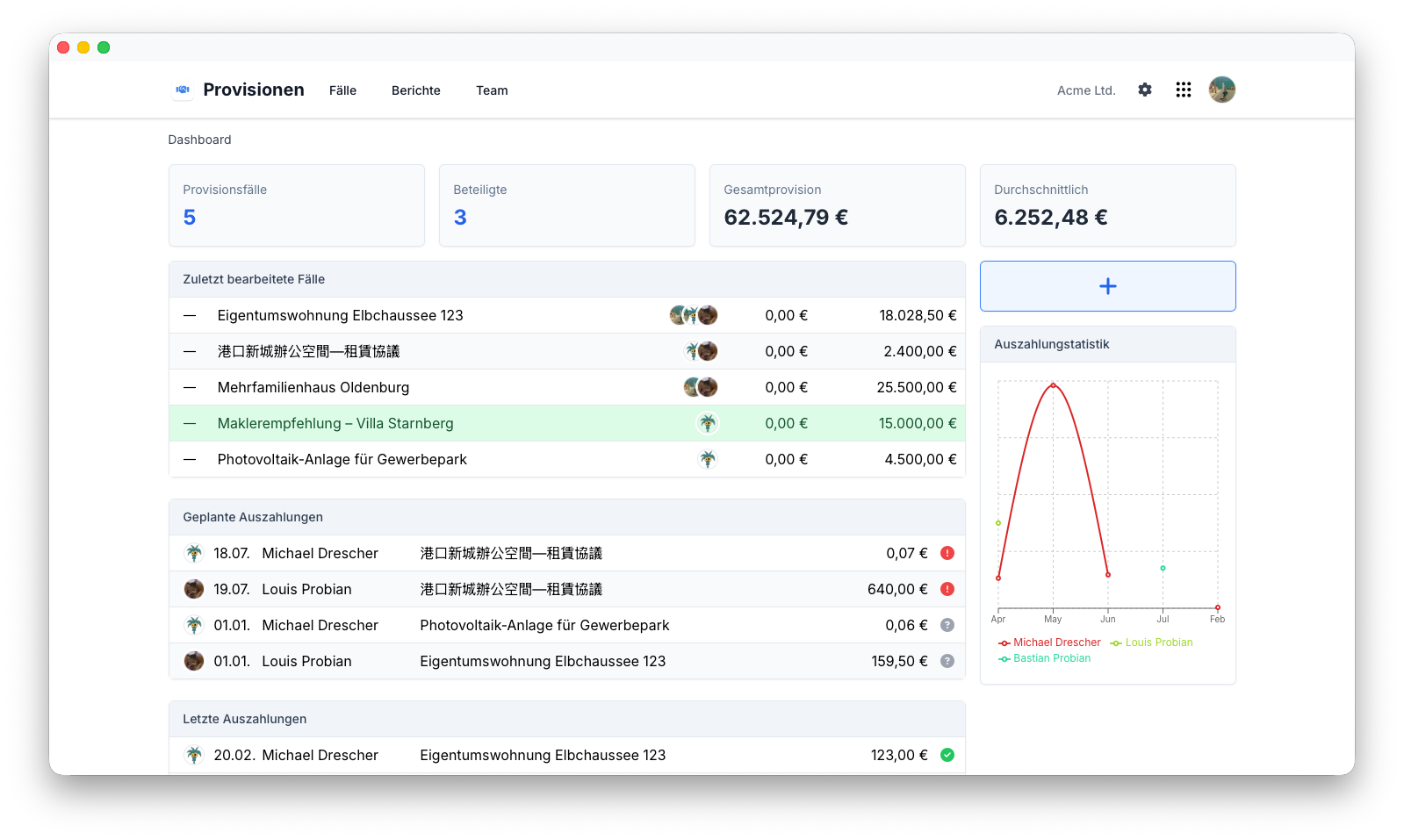
Provisionsfälle
Jede Provision wird als eigener Provisionsfall verwaltet.
Ein Provisionsfall bündelt alle Informationen, die zur Berechnung und Nachverfolgung einer Provision benötigt werden.
Typische Informationen sind:
- Name
- Kategorie
- Vertragsdatum
- Provisionswert
- Umsatzsteuersatz
- Gesamtprovisionssatz
- Teambeteiligung
- Zugeordnete Beteiligte
- Zusätzliche Notizen
Da alle Informationen an einem Ort zusammengeführt werden, bleibt jeder Provisionsfall auch lange nach seiner Erstellung verständlich und nachvollziehbar.
Provisionsberechnung
Flowtig berechnet Provisionswerte direkt anhand der im jeweiligen Provisionsfall hinterlegten Informationen.
Typische Berechnungsgrundlagen sind:
- Brutto-Provisionswert
- Netto-Provisionswert
- Umsatzsteuersatz
- Gesamtprovisionssatz
- Teamprovisionssatz
Die berechneten Werte bleiben mit dem zugrunde liegenden Provisionsfall verknüpft und sorgen so während des gesamten Prozesses für vollständige Transparenz.
Teambeteiligung
An einem Provisionsfall können eine oder mehrere Personen beteiligt sein.
Flowtig erfasst alle Beteiligten und macht die Verteilung von Provisionen transparent und leicht nachvollziehbar.
Typische Informationen sind:
- Zugeordnete Mitarbeiter
- Anteil der Teambeteiligung
- Anzahl der Beteiligten
Dadurch können Provisionsfälle gemeinschaftlich erbrachte Leistungen korrekt abbilden und gleichzeitig den Anteil jedes Beteiligten dokumentieren.
Verdienstübersicht
Provisionen bietet einen fortlaufenden Überblick über verdiente, ausstehende und ausgezahlte Provisionsbeträge.
Anstatt Tabellen manuell zu pflegen, können Organisationen jederzeit den aktuellen Stand ihres Provisionsgeschäfts einsehen.
Typische Fragen sind:
- Wie viel Provision wurde in diesem Monat verdient?
- Wie viel Provision ist noch ausstehend?
- Welche Provisionen wurden bereits ausgezahlt?
- Welche Provisionsfälle warten noch auf ihre Auszahlung?
Dadurch ist Provisionen sowohl für die tägliche Arbeit als auch für die finanzielle Planung ein wertvolles Werkzeug.
Ausstehende Provisionen
Ausstehende Provisionen bleiben sichtbar, bis sie ausgezahlt wurden.
Dadurch können Organisationen:
- Offene Provisionszahlungen verfolgen
- Ausstehende Verpflichtungen überprüfen
- Anstehende Auszahlungen priorisieren
- Einen klaren Überblick über offene Beträge behalten
Die Statusverfolgung hilft dabei, dass keine Provisionszahlung übersehen wird.
Provisionsstatus
Jeder Provisionsfall durchläuft seinen eigenen Lebenszyklus.
Typische Status sind:
| Status | Beschreibung |
|---|---|
| Entwurf | Der Provisionsfall wurde erstellt |
| Ausstehend | Wartet auf Prüfung oder Auszahlung |
| Ausgezahlt | Die Provision wurde ausgezahlt |
| Storniert | Der Provisionsfall ist nicht mehr gültig |
Die Statusverfolgung bietet einen klaren Überblick über ausstehende Provisionszahlungen.
Provisionshistorie
Jeder Provisionsfall bleibt auch nach seinem Abschluss verfügbar.
Historische Provisionsdaten helfen Organisationen dabei, langfristige Entwicklungen zu analysieren und bieten gleichzeitig eine zuverlässige Dokumentation vergangener Provisionsfälle.
Typische Fragen sind:
- Wie viel Provision wurde in diesem Jahr verdient?
- Welcher Mitarbeiter hat die höchsten Provisionen erzielt?
- Welche Provisionen wurden bereits ausgezahlt?
- Wie hoch war die Provision für eine bestimmte Immobilie oder ein bestimmtes Projekt?
Historische Daten bleiben durchsuchbar und stehen auch zukünftig zur Verfügung.
Vollständige Transparenz
Historische Provisionsdaten liefern wertvolle Einblicke und bewahren gleichzeitig eine vollständige Dokumentation jedes Provisionsfalls.
Suche
Provisionsfälle lassen sich schnell und unkompliziert finden.
Typische Suchkriterien sind:
- Name
- Kategorie
- Beteiligter
- Status
- Vertragsdatum
- Provisionswert
Berechtigungen
Provisionen verwendet das zentrale Berechtigungssystem von Flowtig.
Typische Berechtigungen umfassen:
| Berechtigung | Beschreibung |
|---|---|
| Provisionen anzeigen | Provisionsfälle einsehen |
| Provisionen erstellen | Neue Provisionsfälle erstellen |
| Provisionen bearbeiten | Provisionsfälle ändern |
| Provisionen löschen | Provisionsfälle entfernen |
| Beteiligte verwalten | Teammitglieder zuweisen |
Berechtigungen können unabhängig voneinander vergeben werden. Dadurch können Organisationen genau steuern, wer provisionsbezogene Informationen verwalten darf.
Empfehlungen
Empfehlung
Erstellen Sie einen Provisionsfall, sobald ein Vertrag unterzeichnet wurde. So bleiben Berechnungen und Auszahlungen von Anfang an organisiert.
Tip
Weisen Sie alle beteiligten Teammitglieder möglichst frühzeitig zu, damit die Provisionsanteile transparent bleiben.
Note
Überprüfen Sie ausstehende Provisionen regelmäßig, um Provisionszahlungen aktuell zu halten und einen verlässlichen Überblick über offene Verpflichtungen zu behalten.
Integrationen
Provisionen lässt sich nahtlos mit anderen Flowtig-Anwendungen kombinieren.
| Anwendung | Integration |
|---|---|
| Kontakte | Provisionspartner und Beteiligte |
| Rechnungen | Rechnungsbezogene Provisionsfälle |
| Kalender | Provisionsbezogene Termine und Erinnerungen |
Mit neuen Flowtig-Anwendungen werden zukünftig weitere Integrationen verfügbar.
Häufig gestellte Fragen
Können Provisionen auf mehrere Mitarbeiter verteilt werden?
Ja.
Jeder Provisionsfall kann mehrere Beteiligte enthalten. Dadurch lassen sich Provisionsbeträge transparent innerhalb des Teams verteilen.
Können unterschiedliche Provisionsmodelle verwendet werden?
Ja.
Provisionswerte werden anhand der im jeweiligen Provisionsfall hinterlegten Konfiguration berechnet.
Können ausstehende Provisionen verfolgt werden?
Ja.
Provisionen bietet einen fortlaufenden Überblick über ausstehende, abgeschlossene und ausgezahlte Provisionsfälle.
Können vergangene Provisionserträge eingesehen werden?
Ja.
Historische Provisionsdaten bleiben verfügbar. Dadurch lassen sich Erträge über längere Zeiträume analysieren und frühere Provisionsfälle jederzeit nachvollziehen.
Typischer Ablauf
Provisionsfall erstellen
        │
        ▼
Vertragsdaten erfassen
        │
        ▼
Beteiligte zuweisen
        │
        ▼
Provision berechnen
        │
        ▼
Ausstehende Provision verfolgen
        │
        ▼
Auszahlung erfassen
        │
        ▼
Vergangene Erträge einsehen
Siehe auch
Provisionen funktioniert besonders gut zusammen mit:
Benötigen Sie Hilfe?
Benötigen Sie Unterstützung bei Provisionen?
Weitere Informationen finden Sie auf der Flowtig-Website oder über unseren Support:
- https://flowtig.com/apps/commissions
- https://flowtig.com/contact